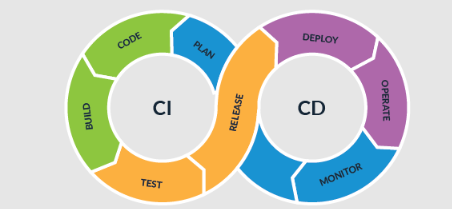
Modern mobile users expect frequent updates, smooth performance, and bug-free experiences. For Flutter developers, meeting these expectations requires more than writing clean code. It demands a reliable Continuous Integration and Continuous Delivery pipeline that ensures every update is tested, validated, and deployed efficiently.
CI/CD has become a cornerstone of professional software development. For Flutter applications, it enables teams to automate builds, execute tests consistently, and release features faster without sacrificing quality. This guide explores best practices for building an effective CI/CD workflow tailored specifically for Flutter projects.
Understanding CI/CD in the Flutter Ecosystem
Continuous Integration refers to the practice of automatically building and testing code whenever changes are committed to a repository. Continuous Delivery extends this concept by preparing validated builds for deployment, often automatically releasing updates to staging or production environments.
Flutter, being a cross-platform framework, supports Android, iOS, web, and desktop applications from a single codebase. This flexibility increases development speed but also introduces complexity. Each platform has its own build requirements, signing processes, and deployment pipelines.
A well-structured CI/CD system ensures that code changes are verified across all targeted platforms before reaching users. This reduces human error and accelerates release cycles.
Setting Up Automated Builds
Automated builds are the foundation of CI/CD. Every time a developer pushes code to a version control system such as GitHub or GitLab, the CI server should:
- Fetch the latest code.
- Install dependencies.
- Compile the Flutter project.
- Generate platform-specific builds.
Tools such as GitHub Actions, Bitrise, Codemagic, and GitLab CI are commonly used in Flutter workflows. These platforms integrate seamlessly with repositories and allow developers to define build scripts using configuration files.
To ensure efficiency, it is important to cache dependencies and reuse build artifacts whenever possible. This reduces build times and improves developer productivity.
Version Control Best Practices
A strong version control strategy supports effective CI/CD. Branching models such as Git Flow or trunk-based development help manage feature releases and hotfixes.
Pull requests should trigger automated builds and test suites before merging into the main branch. This enforces quality gates and ensures that unstable code does not reach production.
Clear commit messages and consistent naming conventions also make debugging and rollback processes smoother when issues arise.
Integrating Automated Testing into the Pipeline
Testing is the most critical component of any CI/CD workflow. Without automated tests, fast releases can quickly turn into unstable deployments.
Flutter supports several testing types:
- Unit testing for validating business logic.
- Widget testing for verifying UI components.
- Integration testing for end-to-end functionality.
Integrating these tests into your pipeline ensures that every code change is validated automatically. When developers commit new features, the CI server executes the entire test suite and reports failures immediately.
At this stage, many teams explore more advanced strategies such as Flutter test automation to strengthen regression coverage and maintain long-term stability. By incorporating structured automation into CI pipelines, developers can detect issues earlier, reduce manual testing efforts, and release updates with greater confidence. A deeper understanding of Flutter test automation can help teams design scalable validation strategies tailored for complex Flutter applications.
Early detection of bugs reduces the cost of fixing defects and prevents negative user experiences after deployment.
Managing Environment Configurations
Enterprise-level Flutter applications often require multiple environments, including development, staging, and production. CI/CD pipelines should manage environment variables securely and consistently.
Sensitive information, such as API keys and signing certificates, must be stored securely using encrypted secrets within CI platforms. Proper environment separation ensures that production data is never exposed during testing phases.
Automated deployment to staging environments allows teams to validate builds before final release.
Continuous Delivery and Deployment Strategies
Once builds pass automated testing, they are ready for delivery. Continuous Delivery prepares validated builds for release, while Continuous Deployment automatically pushes changes to production without manual intervention.
For Flutter apps, deployment strategies may include:
- Publishing to Google Play internal testing tracks.
- Uploading to Apple TestFlight.
- Releasing web builds to hosting platforms.
- Deploying desktop applications through distribution services.
Automated deployment scripts save time and eliminate repetitive manual tasks. However, it is essential to implement approval gates for critical releases to prevent unintended updates.
Monitoring and Feedback Loops
CI/CD does not end with deployment. Monitoring app performance and collecting user feedback are equally important.
Crash reporting tools such as Firebase Crashlytics provide real-time insights into production issues. Performance monitoring identifies bottlenecks that may not surface during testing.
By integrating monitoring data into development workflows, teams can prioritize fixes and continuously improve their applications.
See also: Revolutionizing Sleep: How Technology is Shaping Bedroom Comfort
Leveraging AI in CI/CD Workflows
Artificial intelligence is increasingly influencing software development processes. AI-powered tools can analyze code quality, predict failure points, and optimize testing strategies.
By incorporating artificial intelligence into CI/CD pipelines, teams can improve decision-making and accelerate troubleshooting. Intelligent systems can recommend which test cases to prioritize based on recent code changes.
Additionally, evolving practices such as what prompt engineering brings to the table demonstrate how communication between development and QA teams can be enhanced using AI-driven approaches. This improves collaboration and ensures that automation strategies align with real-world requirements.
AI does not replace structured processes but enhances efficiency when integrated thoughtfully.
Reducing Build and Test Time
Long build times can slow down productivity and discourage frequent commits. Optimizing pipeline performance is therefore crucial.
Best practices include:
- Running tests in parallel.
- Splitting large test suites into smaller groups.
- Caching dependencies.
- Using incremental builds where possible.
Shorter feedback cycles encourage developers to commit changes more frequently, leading to faster innovation and fewer merge conflicts.
Ensuring Security and Compliance
Mobile applications often handle sensitive user data. Security checks should be integrated into CI/CD workflows to identify vulnerabilities early.
Static code analysis tools scan for insecure coding practices. Dependency scanners detect outdated libraries with known security flaws.
Including security validation in automated pipelines protects both users and organizations from potential breaches.
Building a Culture of Continuous Improvement
Technology alone cannot guarantee successful CI/CD implementation. Teams must adopt a mindset focused on continuous improvement.
Regular retrospectives help identify bottlenecks in pipelines. Metrics such as deployment frequency, failure rate, and recovery time provide insights into performance.
Encouraging collaboration between developers, QA engineers, and DevOps specialists fosters shared responsibility for quality.
Final Thoughts
CI/CD for Flutter apps is more than an automation trend. It is a strategic approach that empowers teams to release faster while maintaining reliability. By combining automated builds, integrated testing, secure configuration management, and intelligent monitoring, developers can create stable and scalable mobile applications.
As Flutter continues to grow in popularity, mastering CI/CD best practices will remain essential for teams seeking a competitive advantage. Structured workflows, thoughtful automation, and a commitment to quality ensure that speed never compromises user experience.