We live in a visual world. If you scroll through Instagram for even five minutes, you are bombarded with high-definition content that is nothing short of spectacular. From travel vloggers showcasing the crystal-clear waters of the Maldives in 4K to chefs zooming in on the sizzling texture of a perfect steak, the quality of content on social media has skyrocketed.
But here is the frustrating part: Instagram is a “stream-only” platform. You can look, but you can’t keep.
We have all had that moment where we see a video so good, or a Reel so relatable, that we want to save it. Maybe you want to share it in a group chat where nobody has Instagram. Maybe you want to keep it for offline inspiration when you are on a plane. Or maybe you just want to back up a video you posted years ago because you lost the original file.
So, what do most people do? They take a screen recording.
The problem with screen recording is that it ruins the quality. You capture the interface buttons, your battery percentage, and incoming notifications. Worse, the video gets compressed twice—once by Instagram’s streaming algorithm and again by your phone’s screen recorder. The result is a blurry, grainy mess that looks nothing like the original.
There is a better way. If you want to preserve the crisp, High Definition (HD) quality of the original post, you need a dedicated Instagram Reels downloader.
In this guide, we are going to walk you through exactly how to download Instagram videos and Reels in full HD using igram.site, a free tool designed to bridge the gap between “watching” and “owning” your favorite content.
See also: Transforming Industrial Automation with Advanced Motor Technology
Why “HD” Matters More Than You Think
Before we jump into the “how-to,” let’s talk about quality. Why should you care about using a specific tool like igram.site instead of just recording your screen?
When a creator uploads a video to Instagram, they often shoot in 1080p or even 4K. Instagram compresses this slightly to save data, but the file on their server is still high quality. When you watch it on your phone, you are seeing a streamed version that adapts to your internet speed. If your connection drops, the quality drops.
When you screen record, you are capturing that adapted, potentially lower-quality stream.
However, when you use an Instagram downloader online like igram.site, you are bypassing the streaming adaptation. The tool communicates directly with the Instagram server and requests the original source file. If the original file is 1080p, you get 1080p. If the audio is high fidelity, you get high-fidelity audio.
This is the only way to get a clean, professional-looking file without watermarks or interface clutter.
Getting Started: What You Need
The beauty of igram.site is its simplicity. You don’t need a high-end PC or technical skills. You don’t even need to create an account.
Here is your checklist:
- A device with an internet connection: This can be an iPhone, an Android phone, a tablet, a Mac, or a Windows PC.
- The Instagram App or Browser: You need access to Instagram to find the content.
- A Browser: Safari, Chrome, Firefox, or Edge all work perfectly.
That’s it. No credit cards, no email sign-ups, and absolutely no software installation.
Step-by-Step Guide: Downloading Instagram Videos
Let’s start with standard video posts. These are the regular video squares or rectangles you see in your main feed. They are often longer and higher quality than Stories.
Step 1: Find Your Video
Open Instagram and scroll to the video you want to save. It could be a tutorial, a funny clip, or a memory from a friend’s profile.
Step 2: Copy the Link
This is the most crucial step. You need to get the unique URL for that specific post.
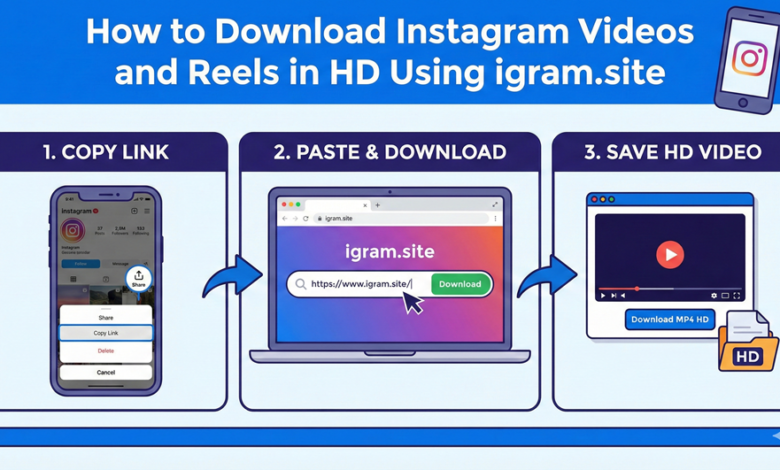
- On Mobile (App): Tap the three dots (…) located in the top right corner of the post. In the menu that pops up, look for a paper airplane icon or a “Share” button, and then tap “Copy Link”.
- On Desktop: Simply go to the post and copy the URL from the address bar at the top of your browser.
Step 3: Navigate to igram.site
Open your mobile or desktop browser and type in igram.site. The homepage is clean and minimalist. You will see a large white search box right at the top.
Step 4: Paste and Download
Tap or click inside that white box and select “Paste.” Once your Instagram link appears there, hit the Download button.
The system takes a few seconds to “fetch” the video. It’s locating the highest quality version available on the server. Once it’s done, the page will reload slightly to show you a preview of the video (so you can confirm it’s the right one). Under the preview, you will see a button, usually labeled “Download .mp4”.
Click that, and the file will save directly to your device. On iPhones, it usually goes to your “Files” app (in the Downloads folder). On Android and Desktop, it goes to your default Downloads folder.
Step-by-Step Guide: Downloading Instagram Reels
Reels are a different beast. They are vertical, fast-paced, and audio-centric. Downloading them via screen recording is notoriously difficult because the audio often desyncs, or the loop cuts off awkwardly.
Using igram.site to download Instagram reels ensures you get the perfect loop and the original audio track.
Step 1: Open the Reel
Tap on the Reels tab in Instagram or open a Reel from someone’s profile.
Step 2: Get the Link
On Reels, the interface is slightly different. The three dots (…) are usually at the bottom right of the screen. Tap those dots. You will see a menu with various options like “Remix,” “Sequence,” etc. You are looking for the “Link” icon (it looks like a chain link). Tap it to copy the link to your clipboard.
Step 3: Head to igram.site
Just like before, open your browser and go to igram.site. You don’t need to look for a specific “Reels” section; the smart downloader detects the link type automatically.
Step 4: The HD Download
Paste the link and hit Download. Note: Because Reels are vertical (9:16 aspect ratio), the preview on igram.site will look vertical too.
When you click the download button, you are getting the file exactly as it was uploaded. This is perfect for reposting to other platforms like TikTok or YouTube Shorts, as the quality remains sharp and professional.
Beyond Video: Photos, Carousels, and Stories
While the title of this guide focuses on video, it is worth noting that igram.site is an all-in-one tool. The HD principle applies to images too.
The Carousel Problem
You know those posts that have 5 or 6 photos and videos mixed together? We call them Carousels. Most basic downloaders fail here—they only grab the first photo and ignore the rest.
igram.site is smart enough to parse the entire album. When you paste a link to a Carousel post, the results page will list every single item in that post separately. You can choose to download just the third video, or the fifth photo, or all of them. Each one is extracted in its highest available resolution.
Saving Stories
Stories are tricky because they disappear. If you want to save a Story, you have to be fast. The process is the same: Copy the Story link (from the three dots menu in the top right of the Story) and paste it into igram.site.
Pro Tip: This is an excellent way to save Stories anonymously. Since you are using a third-party tool to fetch the file, you can view the content offline without your name appearing in the user’s “Viewed By” list.
Why No-Login is a Security Feature
We mentioned earlier that igram.site requires no login. This isn’t just about convenience; it is a major security feature.
There are hundreds of apps on the App Store that claim to be a free Instagram downloader. However, many of them require you to “Log in with Instagram” to function. This is a massive red flag. When you type your password into a third-party app, you are potentially handing over control of your account to unknown developers. This can lead to your account being hacked, or Instagram flagging your account for suspicious activity because a server in a different country is logging into it.
igram.site works on the principle of “Public Access.” If a post is public, our tool can find it using just the link. We do not need your credentials. We do not need to know who you are. This ensures your personal data stays safe and your Instagram account remains secure.
Troubleshooting: How to Ensure the Best Quality
While igram.site is designed to pull the best quality automatically, there are a few things you can do to ensure you are getting that crisp HD look.
1. Check the Source Garbage in, garbage out. If the original user uploaded a blurry, low-light video filmed on a potato, the downloaded file will also be blurry. The tool extracts the original quality—it doesn’t magically enhance it. For the best results, try to download content from creators who use high-end cameras or good lighting.
2. Wait for the Processing Sometimes, especially with long IGTV videos or high-bitrate 4K Reels, the “fetching” process on the site might take an extra second or two. Be patient. Let the tool finish processing the source link to ensure it grabs the full-sized file rather than a compressed preview.
3. Use a Good Connection Since you are downloading large HD files (sometimes 50MB or more for long videos), try to do it while connected to Wi-Fi. If you are on a spotty 4G connection, the download might fail or the file might get corrupted.
Real-World Use Cases
Who actually uses these tools? It’s not just techies. Here are some real-world scenarios where igram.site shines.
The Content Creator: Imagine you are a video editor. A client sends you a link to a Reel and says, “I want a transition like this.” You can’t edit a link. You need the file. You use igram.site to pull the reference video, drop it into your editing timeline, and study the frame-by-frame breakdown.
The “Memory Hoarder”: Instagram accounts get deleted. People get banned. Accounts get hacked. If you have photos of your wedding, your baby’s first steps, or a once-in-a-lifetime trip stored only on Instagram, you don’t really own them. Zuckerberg does. Using an Instagram downloader online allows you to create a local backup of your precious memories on your own hard drive.
The Commuter: You follow a cooking channel that posts 10-minute recipe videos. You want to watch them on the subway home, but there is no signal underground. Download them in the morning using igram.site, and you have your own offline entertainment channel ready to go.
A Note on Safety and Legality
It is important to address the elephant in the room. Is this legal?
The short answer is: Yes, but you need to be responsible.
Downloading content for personal use is generally considered acceptable. This falls under the concept of “fair use” in many jurisdictions, provided you are using the content for offline viewing, archiving, or personal reference.
However, the “Copyright” line is crossed when you re-upload that content. You cannot download a viral video from a celebrity, upload it to your own YouTube channel, and try to monetize it. That is theft.
Use igram.site as a utility for personal convenience. If you do share a downloaded video on another platform, always give clear credit to the original creator. Respect the hard work that goes into making the HD content you enjoy.
Conclusion
The internet is becoming more closed off. Apps want to keep you inside their walled gardens. But the web was built on the idea of open access and sharing.
Tools like igram.site restore a bit of that freedom. They give you the power to curate your own digital library. They allow you to see the content you love in the highest possible quality, without the interference of slow streaming or cluttered interfaces.
Whether you are a professional videographer looking for high-res reference clips, or just someone who wants to save a funny dog video to show their grandma who doesn’t have a smartphone, the ability to download Instagram videos and Reels in HD is a superpower.
So, the next time you tap those three dots and hit “Copy Link,” remember that you don’t have to settle for a blurry screen recording. Head over to igram.site, paste the link, and enjoy the content the way it was meant to be seen.
Fast, free, and crystal clear. That’s the igram.site promise. Happy downloading!