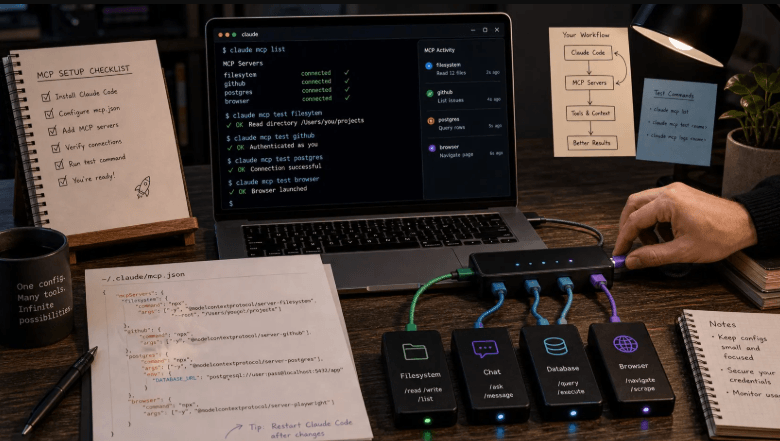
Developers who live in the terminal do not want to click through settings menus to add a tool. Claude Code supports remote MCP servers from the command line, and adding Phrasly takes a single line and a browser approval.
Although Phrasly is a writing tool, plenty of developers write too: documentation, release notes, commit messages, and blog posts. Having text checking and rewriting available in the same session is a small but real convenience.
The Command
Run this in your project: claude mcp add –transport http phrasly https://phrasly.ai/api/mcp. The command registers a remote server named phrasly that uses the HTTP transport. Nothing else needs to be installed locally.
Because the server is remote, there is no package to maintain, no local process to keep running, and no dependency to update. The tradeoff is that it requires network access when you call it.
Authenticating
- Run /mcp inside Claude Code.
- Choose phrasly from the list of servers.
- Select Authenticate.
- Approve access with your Phrasly account in the browser tab that opens.
Which Claude Plans Work
Claude Code can connect on any Claude plan that includes it. That differs from the custom connector in the Claude app, which is limited to certain plans, so the command line is the more flexible route for many individual developers.
What Becomes Available
Once authenticated, the remote MCP server gives Claude Code three capabilities: rewriting text so it reads more naturally, checking text with the Phrasly AI detector, and reporting account status. You ask in plain language and the right tool is selected.
Claude Code also surfaces ready-made prompts. Type /mcp__phrasly to find them. They cover rewriting, rewriting with a before-and-after check, and a straightforward check for AI patterns.
The AI detector on the website offers a quick way to check a README or announcement without opening a terminal, which suits teammates who do not use Claude Code.
Practical Uses for Developers
- Tightening a README or a docs page before opening a pull request.
- Checking release notes drafted with an assistant for stiff or repetitive phrasing.
- Cleaning up a long commit message or changelog entry.
- Reviewing blog posts and announcements before they are published.
Keeping Technical Content Safe
Any rewriting step can alter technical content in ways that matter. Keep code blocks, commands, and identifiers out of the text you send, or review the output carefully. A diff against the original takes seconds and prevents surprises.
Humans should still approve what gets committed. The tool improves how a passage reads, and the developer remains responsible for what it says.
Managing and Removing the Server
Claude Code lists connected servers with the same /mcp command, and you can remove one when you no longer need it. You can also disconnect from your Phrasly settings, which ends access on the Phrasly side.
Fitting It Into a Development Workflow
Developers can use the server wherever text appears in a project. A release checklist might include a quick check of the changelog. A documentation pull request might include a rhythm review of new pages. A launch post might be checked before it goes to the marketing team.
- Run a check on the changelog before tagging a release.
- Review new documentation pages in the same session that created them.
- Keep code and commands out of the text sent for rewriting.
Using Slash Commands Efficiently
Prompts exposed by the server appear as slash commands, which makes repeated actions fast. Learning the three commands, for rewriting, rewriting with a before-and-after check, and a straight check, covers nearly every routine use. Typing the shared prefix lists them, so there is nothing to memorize.
Developers who prefer plain language can skip the commands entirely and simply ask. Both routes lead to the same tools.
Working in Scripts and Automation
Because Claude Code runs in the terminal, it can be used inside scripts and repeatable workflows. A team might build a routine that checks every new documentation file in a branch before review. The remote server handles the request, and the results come back into the same session for a human to evaluate.
Automation should assist review, not replace it. A routine that flags stiff passages and leaves the decision to a person fits that principle, while one that rewrites files unattended does not.
Version Control Habits
Any tool that edits text benefits from good version control habits. Commit the original before any rewrite, review the diff, and keep the changes small. If something goes wrong, reverting is a single command. These habits are second nature to developers and they work equally well for prose.
- Commit the original text before sending it for rewriting.
- Review the diff line by line.
- Keep rewritten changes in a separate commit.
- Revert quickly if a change alters meaning.
When the Connection Misbehaves
If the server does not appear in the list, confirm the command ran without errors and that the address was typed correctly. If authentication fails, rerun the authenticate step and complete the browser approval. If a tool call times out, retry after a moment. Most issues resolve with one of these steps.
Developers comfortable with logs can also check Claude Code’s output for details. The error messages are usually specific enough to point to the cause.
See also: Essential Cybersecurity Basics Every Modern Business Should Implement
Teams Using Claude Code Together
When several developers share a repository, it helps to agree on how the server is configured. A short note in the project documentation, with the command and the authentication steps, ensures everyone sets it up the same way. Each person authenticates with their own Phrasly account, which keeps usage and limits separate.
Teams can also agree on which kinds of text are appropriate to send, for example public documentation and release notes but not confidential design documents. That guidance prevents accidental disclosure and keeps expectations clear.
- Document the setup command in the project README.
- Agree on which files are suitable for rewriting.
- Keep authentication individual rather than shared.
- Review the list of connected servers periodically.
A Short Example Session
A developer finishes a documentation page, opens Claude Code in the project, and asks it to check the page for stiff or repetitive phrasing. The tool returns a verdict and a list of flagged sentences. The developer asks for a lighter rewrite of two of them, reviews the diff, keeps one change, rejects the other, and commits the result with a clear message.
The whole exchange takes a few minutes and never leaves the terminal. That is the appeal for developers: the writing check lives where the work already happens, in the same session, under the same version control, with the same review habits applied to prose as to code.
Developers who try it for a week usually settle into a natural rhythm, using it on documentation and announcements and ignoring it for everything else, which is exactly how a good tool should fit into a working day.
For developers who write documentation, release notes, and announcements regularly, the setup is a one-time effort that returns a small benefit every day. It is the sort of quiet improvement that rarely makes headlines but steadily raises the quality of the writing a team ships.
Adding a remote MCP server is a one-line job, and the result is a writing toolkit inside the terminal session developers already use. Used with sensible review habits, it saves small amounts of time that add up across a week of documentation work.